


SMT Placement Accuracy and Machine Maintenance Guide
SMT placement accuracy depends on the CAD library, component placement rules, machine calibration, and maintenance. A component cannot be placed correctly if its footprint is wrong or if the placement machine is not aligned. Accuracy must be planned during design and protected during production.
PCB design CAD tools include many utilities that help the designer place components precisely. These tools are often not used to their full potential, even though they can prevent expensive manufacturing problems.
This guide explains how CAD tools improve placement accuracy and why regular placement machine maintenance is essential for the final PCBA quality.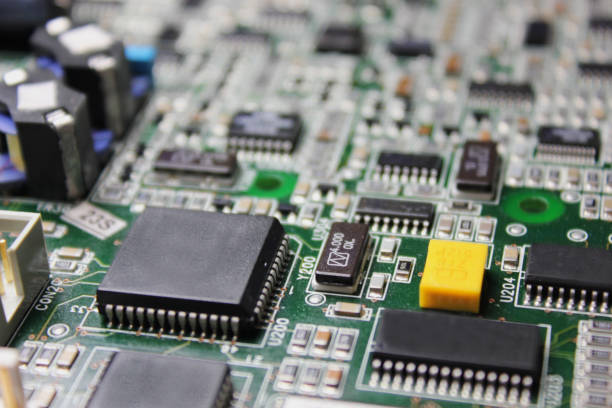
Use a Precise Component Library
The importance of creating precise components in CAD tools cannot be overemphasized. A bad footprint can create a component that is too close to a neighbor, too large for the pad, or impossible to solder correctly.
Unexpected manufacturing problems often start with a library error. If the pad size is wrong, the component may not align with the actual package leads.
Use the automatic part generator and wizard when possible. These tools are usually based on IPC specifications and can reduce the manual effort of creating a new footprint.
Online library services can also provide tested component footprints for common parts.
Apply Design Rules Correctly
Design rules are frequently underutilized in PCB design software. Basic rules set the spacing between pads, traces, and board edges.
Advanced functions can define different clearance values for component groups, board areas, and sides of the board. This gives the designer control where it is needed.
Use the cross-detection function of the design tool so that components are placed in the correct order according to the signal path defined in the schematic.
Clear rules reduce placement collisions and allow the placement machine to reach every pad.
Use Automatic Placement Helpers
Many PCB tools can automatically perform component alignment and copy placement modes. These features save time and ensure that identical circuit blocks are placed in the same way.
Automatic placement helpers also improve the consistency of the design. If one block is correct, the copied block will be correct as well.
The designer should still review the automatic placement result before routing begins.
An automatic function cannot replace an engineer who understands the thermal, mechanical, and high-speed signal requirements.
Use 3D Models for Clearance Review
By using STEP models, many PCB design systems allow the designer to view the board as a complete 3D assembly. The layout tool can check clearance conflicts in the X, Y, and Z axes, but a 3D view makes the conflict visible.
Design rules may allow a manufacturing gap between parts, but 3D inspection can show whether there is enough space to insert a connector or perform manual rework.
3D models are also useful for checking component height against the enclosure.
The 3D review should be part of the design release check.
Follow Electrical and Mechanical Requirements
Components should be placed according to the electrical, thermal, mechanical, and manufacturing specifications of the board. The schematic is a useful roadmap for the component placement.
High-speed components should be placed close to their related circuits, and power components should allow enough area for heat spreading.
Mechanical parts should be placed so that they can be inserted and removed without interference.
Placement analysis tools can verify the final accuracy before the board files are sent to the factory.
Understand the Assembly Process Rules
The component placement rules should be understood before the layout starts. This information can be obtained from the PCB contract manufacturer or the assembly service.
The factory can provide rules for component spacing, orientation, fiducial placement, and rework clearance. Following these rules prevents a design that cannot be assembled efficiently.
The placement direction of polar components should be consistent so the operator and machine can identify them quickly.
DFM feedback from the assembly partner should be added to the company design standard.
Why the Placement Machine Needs Maintenance
The placement machine is a complex electromechanical device. During long operation, dust can collect on screws, guide rails, sliding blocks, drive belts, and motor couplings.
If the machine is not cleaned and lubricated on schedule, the moving parts wear faster and the placement accuracy decreases. Overloaded machine parts also reduce the service life of the equipment.
Machine maintenance is not optional. It is the direct way to protect placement accuracy and production quality.
Clean Machine Surfaces and Control Boards
Dust and scale on the machine surface and circuit board can reduce heat dissipation inside the machine. Poor heat dissipation can cause power components to overheat and burn.
The cleaning procedure should include the control cabinet air intake, fans, and heat sinks. Air filters should be cleaned or replaced at the scheduled interval.
Cleaning should not use a strong air gun that forces dust into electrical connectors or moving parts.
A clean machine is also easier to inspect for leaks, worn cables, and loose fasteners.
Clean the Air System
The internal air circuit, solenoid valves, vacuum generators, and cylinders should be disassembled and cleaned at the required interval.
Oil in the air path can block the gas path and cause the machine to lose vacuum or actuator force. In serious cases, accumulated oil can corrode the internal sealing rings and components.
Solenoid valves, vacuum generators, and cylinders that are damaged by contamination must be replaced. Regular cleaning prevents this damage.
The air filter and water separator should also be checked to protect the complete air system.
Reduce Alarms and Improve Efficiency
Proper maintenance can reduce the chip transfer rate, lower the number of alarms, and improve production efficiency. A machine that does not stop for missed picks can place more boards per shift.
Maintenance also improves the quality of the final PCBA. Components are placed more consistently when the machine motion and vision systems are clean and accurate.
The maintenance schedule should be based on the machine operating hours and the factory environment.
Find Hidden Problems Before They Stop the Line
After a long warranty period and continuous operation, some machine parts may contain hidden dangers. Examples include circuit wear, cable track wear, loose motor fixing screws, failing mechanical parts, and incorrect parameters.
A comprehensive maintenance service should check the machine and solve these hidden problems before they threaten normal production.
Preventive maintenance is less expensive than an unscheduled machine failure during a high-volume order.
The maintenance report should list the condition of each part and the action taken.
Calibrate After Wear
After long operation, machine parts wear, deform, and move away from their original parameters. The placement machine parameters may no longer match the current machine state.
This wear affects placement accuracy. Regular calibration restores the machine coordinate system and vision relationship so the head places components at the correct position.
Calibration should be performed after major repair, after a part replacement, and at a regular preventive maintenance interval.
High-precision calibration allows the machine to produce PCBA products with high quality and repeatability.
A professional SMT PCB assembly service uses accurate CAD libraries and maintained placement machines. The two factors work together to achieve placement accuracy.
The design should be checked by the PCB design and layout team before the board is released, and the assembled board should be verified by PCBA testing.
Maintenance data should be stored under quality management so the factory can predict when a machine needs service.
Placement Process Verification
The placement program should be verified on a test board before production. The machine places components on a sample board and the operator compares the positions with the design. If all components are aligned, the program is released for the full lot.
Automated optical inspection after placement can measure component position and detect missing parts. A small placement error that is acceptable for one product may be too large for a fine-pitch BGA. The inspection limit should be set according to the component type and the manufacturing specification.
When a placement error appears, the operator should check the machine calibration before correcting the program. Changing the program to compensate for a machine problem will create an error on every future board.
Coordinate Machine and Line Maintenance
The placement machine maintenance schedule should be coordinated with the line production plan. Preventive maintenance should be performed when the line is stopped for a product change or during a scheduled break so that it does not reduce output.
The maintenance team should keep spare parts for the most common wear items: nozzles, belts, filters, solenoid valves, and camera lamps. The maintenance history should be reviewed with the placement accuracy data to identify a part that needs replacement more often than expected.
A complete maintenance program protects the machine investment and gives the customer consistent PCBA quality.
Conclusion
SMT placement accuracy starts with accurate CAD component libraries and correct design rules. Automatic placement helpers and 3D reviews make the design easier to assemble.
The placement machine must then be cleaned, lubricated, inspected, and calibrated to maintain that accuracy. Regular maintenance reduces alarms, prevents wear, and protects the final PCBA quality.
When design and machine maintenance work together, the SMT line produces accurate and reliable circuit boards.