


How to Remove PCB Corrosion: PCB Design & PCB Manufacturing Guide
Printed circuit boards (PCBs) are essential to modern electronic products because they provide the physical and electrical infrastructure required to implement increasingly complex functions. As electronic devices become smaller while integrating more processing power, sensors, communication interfaces, and intelligent features, PCB structures have evolved from simple single-layer boards into compact multilayer assemblies.
Modern integrated circuits can contain extremely large numbers of transistors, allowing sophisticated functionality to be integrated into relatively small PCB assemblies. However, increasing circuit density also makes PCBs more sensitive to environmental conditions, contamination, manufacturing defects, and long-term aging.
One of the common threats to PCB reliability is corrosion.
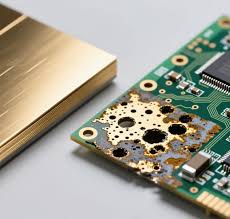
PCB corrosion is the gradual deterioration of copper, solder, component leads, and other metallic structures due to chemical or electrochemical reactions with moisture, oxygen, ionic contaminants, chemicals, or other environmental substances. If corrosion is not identified and controlled at an early stage, it can increase electrical resistance, weaken solder joints, damage conductive traces, and eventually cause intermittent failures or complete PCB malfunction.
The good news is that minor surface corrosion does not always mean that the entire PCB must be replaced. Depending on the extent and location of the damage, careful cleaning, inspection, and repair may restore the board to functional condition.
This guide explains what causes PCB corrosion, the major types of corrosion, early warning signs, how to remove corrosion from a PCB, when a board should be repaired or replaced, and how proper PCB Design and PCB Manufacturing practices can help prevent corrosion.
What Is PCB Corrosion?
PCB corrosion is the gradual degradation of metallic structures on a printed circuit board caused by chemical or electrochemical reactions.
Copper is commonly used for PCB traces, pads, planes, and vias. Other metals are present in solder joints, component terminals, connectors, and surface finishes. When these metals are exposed to moisture, oxygen, ionic contamination, corrosive chemicals, or electrical bias under suitable conditions, chemical reactions can occur.
Common visible signs of PCB corrosion include:
- Green or blue deposits on exposed copper
- White or powdery residues
- Dark or blackened metal surfaces
- Brown or reddish discoloration
- Corroded component leads
- Deteriorated solder joints
- Damaged copper traces
- Peeling or discolored solder mask
As corrosion progresses, the affected metal may become thinner or develop higher electrical resistance. Corrosion around connectors, pads, and vias can also cause intermittent electrical connections.
In severe cases, corrosion can completely interrupt a conductor or create unintended conductive paths between adjacent nodes.
Early detection is therefore important because repairing localized corrosion is generally easier than restoring a board after extensive trace and component damage.
Common Causes of PCB Corrosion
Understanding the causes of corrosion is essential for effective PCB Maintenance and prevention.
Humidity and Moisture
Moisture is one of the most important environmental factors contributing to PCB corrosion.
High humidity can create a thin layer of moisture on the PCB surface. When ionic contaminants are present, this moisture can become sufficiently conductive to support electrochemical reactions.
Long-term exposure to condensation, high humidity, or direct water contamination can accelerate corrosion.
Battery Leakage
Battery leakage can cause serious PCB damage.
If an electrolyte leaks from a battery and reaches copper traces, pads, connectors, or component terminals, the chemical residue can attack metallic structures.
Battery leakage should be treated as a potentially serious contamination event rather than simply wiping away visible liquid.
Flux Residues
Flux is essential for many soldering processes, but certain flux residues can contribute to corrosion or electrochemical migration if they are not properly controlled.
The risk depends on the flux chemistry, residue level, humidity, electrical bias, and application requirements.
Not every PCB requires aggressive post-assembly cleaning. Cleaning requirements should be determined according to the flux type, process specification, and reliability requirements.
Chemical Contamination
Exposure to acids, solvents, cleaning chemicals, industrial chemicals, and other corrosive substances can damage PCB materials and metal surfaces.
Chemical contamination can occur during manufacturing, maintenance, transportation, or product operation.
Salt and Marine Environments
Electronic products used near oceans or in marine environments can be exposed to salt-containing air and moisture.
Salt deposits can increase surface conductivity and accelerate electrochemical corrosion, especially when combined with humidity and electrical bias.
Industrial Pollution
Industrial environments may contain sulfur compounds, chemical vapors, dust, moisture, and other contaminants.
These contaminants can accumulate on PCB surfaces and accelerate corrosion over time.
Improper Storage
PCBs stored in uncontrolled environments can absorb moisture or become contaminated.
Inadequate packaging, high humidity, temperature fluctuations, and condensation can all increase the risk of corrosion.
Proper moisture-control procedures are therefore important for both bare PCBs and assembled electronic products.
Types of PCB Corrosion
Different corrosion mechanisms can produce different physical and electrical effects. Identifying the likely mechanism can help engineers determine an appropriate corrective action.
Oxidation
Oxidation occurs when metal reacts with oxygen, often with moisture contributing to the reaction.
Copper oxidation can cause the metal surface to become darker or develop a characteristic greenish or bluish corrosion product under certain environmental conditions.
Oxidation may gradually affect solderability and electrical contact quality if the affected surface becomes heavily degraded.
Galvanic Corrosion
Galvanic corrosion can occur when two dissimilar metals are electrically connected in the presence of an electrolyte, such as moisture containing dissolved ions.
The difference in electrochemical potential between the metals can cause one metal to corrode preferentially.
This mechanism can be particularly important around connectors, plated structures, solder joints, and dissimilar-metal interfaces.
Electrochemical Migration
Electrochemical migration is a particularly important reliability concern for densely routed PCBs.
When moisture and ionic contamination are present between electrically biased conductors, metal ions can migrate and eventually form conductive filaments or dendritic structures.
This process can lead to leakage currents or unintended electrical connections between adjacent conductors.
It is especially relevant to fine-pitch and high-density PCB Design where conductor spacing is small.
Chemical Corrosion
Chemical corrosion occurs when metallic or PCB materials react directly with aggressive chemical substances.
Exposure to inappropriate cleaning chemicals, acids, industrial contaminants, or other reactive substances can damage copper, solder, surface finishes, and solder mask.
The damage can range from discoloration to severe conductor loss.
Signs of PCB Corrosion
Early identification can prevent minor contamination from developing into extensive PCB damage.
Look for the following warning signs:
- Green, blue, or white deposits around copper pads or traces
- Brown or reddish deposits near solder joints
- Blackened or discolored solder joints
- Corroded component leads
- Dull or degraded connector contacts
- Lifted or damaged copper traces
- Peeling or discolored solder mask
- Powdery residue on the PCB surface
- Intermittent electrical connections
- Unexpected resistance changes
- Unexplained circuit failures
- Failures that appear or disappear when the PCB is moved or exposed to temperature changes
Electrical symptoms can sometimes appear before severe visual damage becomes obvious.
For this reason, corrosion inspection should include both physical inspection and electrical testing when reliability is important.
How to Remove Corrosion from a PCB
The correct method for removing PCB corrosion depends on the type and severity of contamination.
Before starting, disconnect the PCB from all power sources and remove batteries or other energy sources. If the board belongs to a safety-critical system, consider professional failure analysis before attempting cleaning or repair.
Step 1: Assess the Extent of the Damage
Work in a clean, well-lit area and inspect the PCB under magnification.
Identify:
- Corroded copper
- Damaged pads
- Affected solder joints
- Contaminated connectors
- Damaged components
- Discolored areas
- Possible trace interruptions
- Signs of corrosion beneath components
The objective is to determine whether the problem is primarily surface contamination or whether the corrosion has already damaged the PCB structure.
Do not assume that all corrosion is superficial. Corrosion can propagate beneath components, coatings, connectors, and solder mask.
Step 2: Remove Loose Contamination
Use a soft, ESD-safe brush to gently remove loose debris and surface contamination.
For difficult-to-reach areas, controlled low-pressure air may help remove loose particles.
Avoid aggressive mechanical scrubbing because copper traces, solder mask, component markings, and small components can be damaged easily.
Step 3: Clean with an Appropriate Solvent
High-purity isopropyl alcohol (IPA) is commonly used for PCB cleaning because it is effective against many organic residues and evaporates relatively quickly.
Apply an appropriate amount of IPA using a lint-free swab or soft ESD-safe brush and gently clean the affected area.
However, IPA should not be treated as a universal corrosion remover. It may remove contaminants and residues, but heavily oxidized or chemically damaged metal may require additional mechanical or professional repair methods.
The cleaning process should also be compatible with the PCB materials, components, coatings, and contamination involved.
Step 4: Rinse When the Cleaning Process Requires It
For certain water-soluble contamination or specialized PCB-cleaning processes, a controlled rinse may be required.
Deionized or appropriately purified water is generally preferable to ordinary tap water when a water rinse is specified because tap water contains dissolved minerals and ions that can remain on the PCB after drying.
Not every PCB should simply be immersed in water. The appropriate cleaning and rinsing process depends on the board construction, components, contamination, and manufacturer’s requirements.
Step 5: Dry the PCB Thoroughly
Drying is a critical part of PCB cleaning.
Residual moisture can cause leakage currents, electrochemical reactions, and additional corrosion when the board is powered.
Use an appropriate drying method, such as:
- Lint-free materials for surface moisture
- Controlled low-temperature airflow
- Clean compressed air
- A suitable drying chamber for professional processes
Avoid excessive heat because some PCB components, plastics, adhesives, batteries, and coatings may be temperature-sensitive.
The board should be completely dry before electrical testing or power is reapplied.
Step 6: Reinspect and Electrically Test the PCB
After cleaning, inspect the PCB again under magnification.
Check for:
- Remaining corrosion
- Damaged traces
- Missing pads
- Corroded vias
- Damaged component leads
- Poor solder joints
- Contamination beneath components
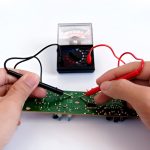
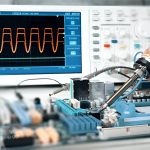
Then perform appropriate PCB Testing, such as:
- Continuity testing
- Resistance measurements
- Insulation checks
- Power-rail verification
- Functional testing
- Signal measurements
If corrosion has damaged a trace or pad, additional PCB repair or rework may be necessary.
Tools and Materials for PCB Corrosion Cleaning
A basic PCB cleaning workstation may include:
- High-purity IPA suitable for electronics cleaning
- Appropriate purified or deionized water when required
- Soft ESD-safe brush
- Cotton or foam swabs compatible with electronics
- Lint-free cloth
- Chemical-resistant gloves
- Safety goggles
- Controlled compressed air
- Magnifying glass or microscope
- ESD-safe workstation
A clean, bright workspace with proper ESD protection can make the inspection process safer and reduce the chance of introducing additional contamination.
What Should Not Be Used to Clean a PCB?
Using inappropriate cleaning tools or chemicals can cause damage that is as serious as the original corrosion.
Steel Wool or Coarse Sandpaper
Abrasive materials can scratch copper surfaces, remove solder mask, damage pads, and reduce conductor thickness.
They should generally be avoided for delicate PCB structures.
Steel Brushes
Steel brushes are too aggressive for most PCB applications and can damage fine traces, solder mask, component leads, and small components.
Household Cleaners
Household cleaning products may contain chemicals that are incompatible with PCB materials, metals, coatings, or components.
Unless a cleaning chemical is specifically approved for the intended PCB application, it should not be used.
Strong Solvents
Solvents such as acetone can attack certain plastics, coatings, adhesives, labels, and solder-mask materials.
Do not assume that a strong solvent is a better PCB cleaner.
Tap Water
Tap water contains dissolved minerals and ions that can remain on the board after drying.
When a water-based cleaning process is appropriate, purified or deionized water is generally more suitable.
When Should You Repair or Replace a Corroded PCB?
Whether a corroded PCB should be repaired or replaced depends on the location, severity, and extent of the damage.
| Repair May Be Appropriate When | Replacement May Be Appropriate When |
|---|---|
| Corrosion is limited to the surface | Multiple PCB layers are significantly damaged |
| Copper traces remain structurally intact | Internal traces or vias are severely compromised |
| Only a small area is affected | Corrosion covers a large portion of the board |
| Components remain electrically functional | Multiple components are severely damaged |
| Damaged pads or traces can be reliably repaired | The board has extensive delamination or structural damage |
| Electrical performance can be fully verified after repair | Reliability or certification requirements cannot be restored confidently |
If corrosion has penetrated internal layers, damaged numerous vias, or affected a large area of copper, repeated cleaning may not restore the original reliability.
For commercial, automotive, medical, aerospace, industrial, or other high-reliability applications, repair decisions should also consider traceability, qualification requirements, environmental conditions, and applicable quality standards.
How to Prevent PCB Corrosion
Preventing PCB Corrosion is generally more economical than repairing extensive damage.
Store PCBs in Controlled Conditions
Keep PCBs in an environment with appropriate temperature and humidity control.
Moisture-sensitive assemblies may require additional moisture-control procedures depending on their components and storage requirements.
Control Humidity
Use appropriate environmental controls in storage and production areas where high humidity is a concern.
Avoid rapid temperature changes that can cause condensation.
Use Moisture-Barrier Packaging
Appropriate moisture-barrier packaging and desiccant materials can help protect PCBs during storage and transportation.
The packaging method should match the required storage conditions and applicable industry procedures.
Apply Conformal Coating When Appropriate
A conformal coating can provide an additional protective barrier against moisture, dust, and certain environmental contaminants.
However, conformal coating is not suitable for every PCB. Connector contacts, test points, switches, heat-generating components, and other areas may require masking or special treatment.
Keep PCBs Clean
Prevent excessive accumulation of dust, flux residues, salts, and other contaminants.
Cleaning requirements should be based on the PCB assembly process and reliability requirements rather than applying the same cleaning procedure to every product.
Perform Regular Inspection
Periodic inspection can identify early corrosion before conductive traces, pads, connectors, or components are seriously damaged.
For critical equipment, combine visual inspection with appropriate electrical or environmental testing.
Remove Batteries During Long-Term Storage When Appropriate
For products designed for battery removal, disconnecting or removing batteries during long-term storage can reduce the risk of battery leakage.
Follow the battery manufacturer’s storage recommendations.
Use Appropriate Enclosures and IP Protection
For outdoor, industrial, marine, or humid applications, a suitable enclosure can reduce exposure to moisture and contaminants.
The required ingress-protection level should be selected according to the actual operating environment.
Common PCB Corrosion Cleaning Mistakes
Using Tap Water Without Proper Rinsing and Drying
Tap water can leave dissolved minerals and ionic residues on the PCB. If water cleaning is appropriate, use a controlled process and dry the board thoroughly.
Using Aggressive Chemicals
Strong solvents or inappropriate household chemicals may damage solder mask, plastics, coatings, labels, and components.
Scrubbing Too Aggressively
Excessive mechanical force can lift pads, damage traces, remove solder mask, or break fragile components.
Inadequate Drying
Residual moisture can create additional leakage paths and accelerate corrosion after power is restored.
Ignoring ESD Protection
Sensitive ICs can be damaged by electrostatic discharge during cleaning or handling, even when no visible damage occurs.
Powering the Board Before Inspection Is Complete
Applying power to a contaminated or wet PCB can create short circuits, leakage currents, electrochemical reactions, and additional component damage.
Always complete appropriate inspection and drying before restoring power.
The Role of PCB Design and Manufacturing in Corrosion Prevention
Corrosion resistance begins long before a PCB reaches the repair stage.
During PCB Design, engineers should consider the operating environment, conductor spacing, surface finish, component placement, enclosure, thermal conditions, and contamination risks.
For humid or corrosive environments, the design may need additional protection, such as:
- Appropriate surface finishes
- Increased conductor spacing where required
- Conformal coating
- Sealed or protected connectors
- Environmental protection
- Proper drainage or enclosure design
- Materials selected for the operating environment
During PCB Manufacturing and PCB Assembly, process control is equally important.
Manufacturers should control factors such as:
- Material handling
- Copper and surface-finish quality
- Soldering processes
- Flux selection
- Cleaning requirements
- Ionic contamination
- Solder-mask application
- Inspection
- Electrical testing
A reliable PCB is therefore the result of coordinated design, material selection, manufacturing, assembly, environmental protection, and maintenance.
Kingda can support PCB projects by integrating manufacturability considerations into PCB fabrication and assembly, helping engineering teams address reliability requirements before corrosion becomes a field failure.
Conclusion
PCB corrosion can result from humidity, moisture, battery leakage, ionic contamination, chemicals, salt exposure, industrial pollution, and improper storage. Depending on the conditions, corrosion may occur through oxidation, galvanic reactions, electrochemical migration, or direct chemical attack.
Early detection is critical. Green or white deposits, discoloration, damaged solder joints, corroded component leads, deteriorated copper traces, and unexplained intermittent failures can all indicate a potential corrosion problem.
For minor contamination, careful inspection and an appropriate PCB cleaning process may restore the board. High-purity IPA can be useful for removing many organic residues, but it should not be regarded as a universal treatment for chemically damaged metal. Severe corrosion may require trace repair, pad repair, component replacement, failure analysis, or complete PCB replacement.
The most effective approach is prevention. Appropriate PCB Design, material selection, controlled PCB Manufacturing, proper assembly processes, environmental protection, moisture-controlled storage, conformal coating where appropriate, and regular inspection can significantly reduce corrosion-related failures.
For professional electronic products, combining prevention, inspection, testing, and controlled maintenance is essential for achieving long-term PCB reliability.